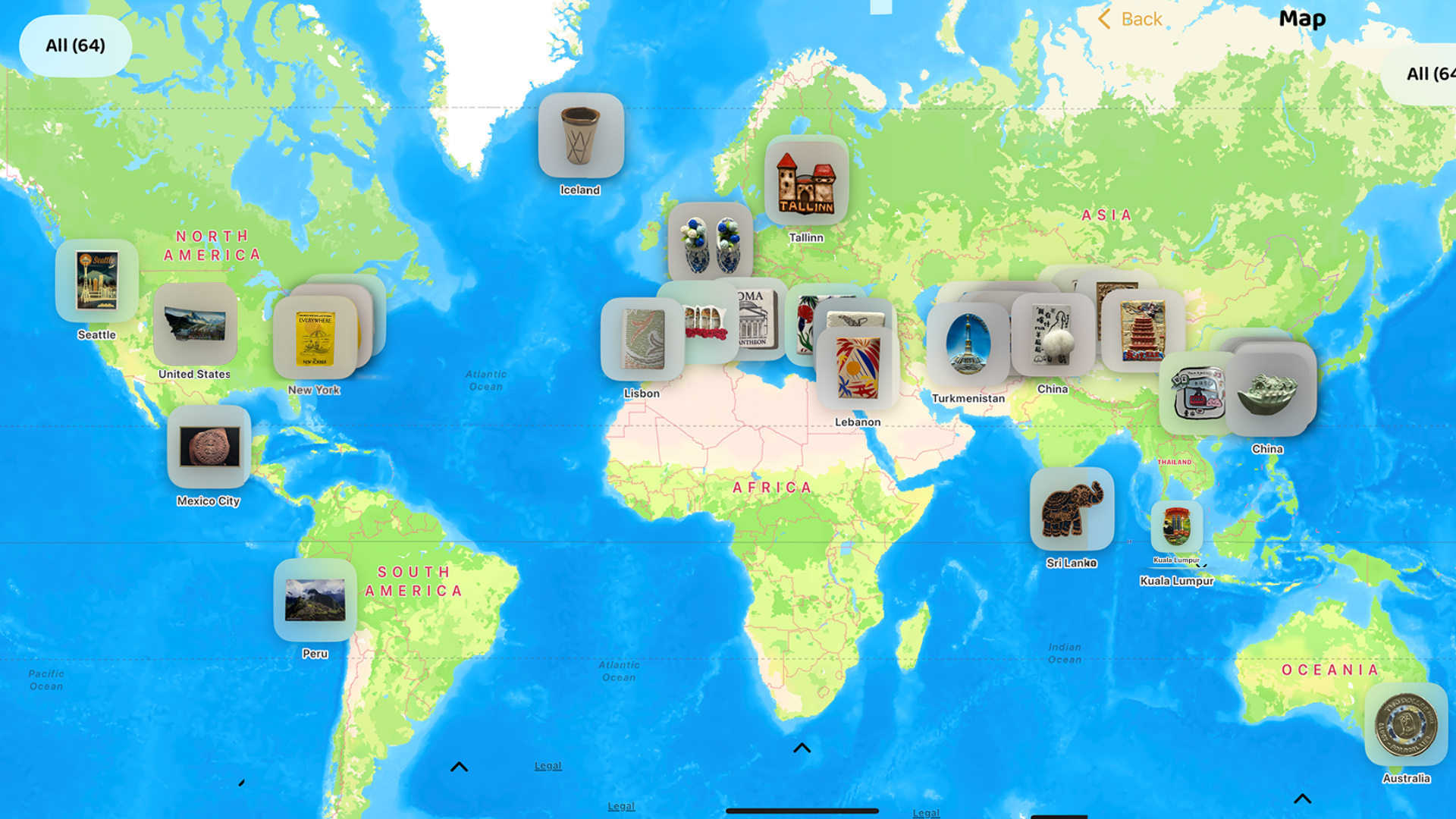
A keepsake map view lets you see travel magnets, postcards, tickets, and souvenirs by place instead of by a flat list, so you can reopen a memory from the city, museum, station, or route where it began.
In MagnetStory, that means you can open a map, see where your keepsakes were collected, compare trips visually, and jump straight into each item's Item View from the same screen.
What the new map feature does
The new map feature puts location-aware items onto a map so you can understand your collection spatially. Each pin represents a real collecting place, and each pin can lead back to the saved item and its Item View.
Map View: see your collection across countries, cities, and routes.
Item pins: open the keepsakes that belong to each place.
Item View link: move from the map to the item's detail view without losing context.
Memory benefit: reconnect the object at home with the exact place where it entered your life.
Why a map matters for a keepsake collection
A keepsake collection is not only a set of objects. It is also a record of movement. Map View makes that movement visible by showing how one collection can stretch across the globe, from local markets to distant museums, from train stations to small gift shops.
This is useful for collectors because location often carries the emotional weight of the memory. The magnet on your fridge might be small, but the place behind it can be far away, difficult to revisit, or tied to a very specific day. Seeing those places together on a map makes the collection easier to read and easier to remember.
Why this is different from a normal list or grid
A normal collection list is useful when you already know the item name. A keepsake map view is better when you remember the place first, want to compare trips visually, or want to understand how your collection spreads across cities and countries.
That is the key difference: a list groups by item order, while a map groups by memory geography. For collections tied to travel, museums, and movement, that geographic view can be easier to understand than scrolling card by card.
From map pin to Item View
The key interaction is simple: tap a location, find the item, and open its Item View. Item View is where the object, title, notes, images, and place details become one readable memory entry.
That connection matters because a map alone is not enough. The map shows where the item belongs; Item View explains what it is, why you kept it, and what happened there. Together, they turn location data into a memory interface rather than a generic map screen.
MapKit helps the collection feel alive
This feature uses a map-based interface to make the app feel more physical and more connected to travel. When items appear across the world, the collection stops looking like a flat archive and starts looking like a lived route.
For MagnetStory, that is a natural fit. The app already links physical objects to photos, notes, and stories. Adding a map means those same items can now also be linked to their collecting geography, which makes the memory more complete.
Good use cases for Map View in MagnetStory
Map View is especially useful when your keepsakes come from different trips, different cities, or repeated visits over time. It gives structure to a collection that might otherwise feel scattered.
- Travel magnets: see how your fridge magnet collection spreads across countries and cities.
- Museum postcards: group art and design memories by museum location.
- Tickets and passes: reconnect transport objects with the route they came from.
- Small local finds: remember where a coin, card, flyer, or handmade object was picked up.
- Repeated journeys: compare how one city appears across different years and trips.
Who benefits most from a keepsake map view
This feature is especially useful for travelers who save one small object from each place, collectors who revisit the same city over multiple years, and museum-goers who want to connect postcards or tickets back to exact locations.
It also works well if you already use a keepsake memory app approach or build a digital travel scrapbook from physical objects. Map View adds a place-first way back into the same memories.
Why this helps when you are away from home
One of the nicest parts of Map View is that it works even when the physical collection is not with you. You might be traveling again, moving between cities, or simply away from the shelf, box, or fridge where the objects live. The map still lets you see the shape of your collection and reopen the memories attached to each place.
That makes the app useful in a very practical way: your keepsakes stay anchored to the world, not only to the room where you store them.
How I would use this feature
I would use Map View as the fastest way to revisit a travel collection without deciding on one object first. Sometimes I do not remember the name of the magnet or postcard. I remember the place. Starting from the map solves that problem immediately.
It also makes patterns visible: where most of the collection comes from, which routes produced the strongest memories, and which places I keep returning to through objects.
If your collection is still messy, it pairs naturally with the workflow in how to organize travel souvenirs and memories, because once the object, place, and notes are connected, the map becomes much more useful.
FAQ about MagnetStory Map View
What is MagnetStory Map View?
MagnetStory Map View is a location-based collection screen that shows saved keepsake items on a map and lets you open each item's Item View from its pin or place grouping.
What kinds of items work well on the map?
Travel magnets, postcards, museum tickets, paper ephemera, small souvenirs, and other objects with meaningful collecting places work especially well on the map.
Why link the map to Item View?
The map answers where the item belongs. Item View answers what the item is and why it matters. Linking both views keeps location and story connected.
Why is this better than a normal list?
A normal list is useful when you know the item already. A map is better when you remember the place first, want to see your collection around the globe, or want to revisit travel routes visually.
Get MagnetStory on the App Store
MagnetStory is made for people who want to connect keepsakes, places, photos, and stories in one memory app.
Download MagnetStory from App Store。
 ← Back to Blog